Adding a Tracker
Tracker Tracker works with 40+ trackers. Pick one from the list below.
Open the Add Tracker dialog
Click the + button next to "Trackers" in the sidebar, or go to /trackers/new.
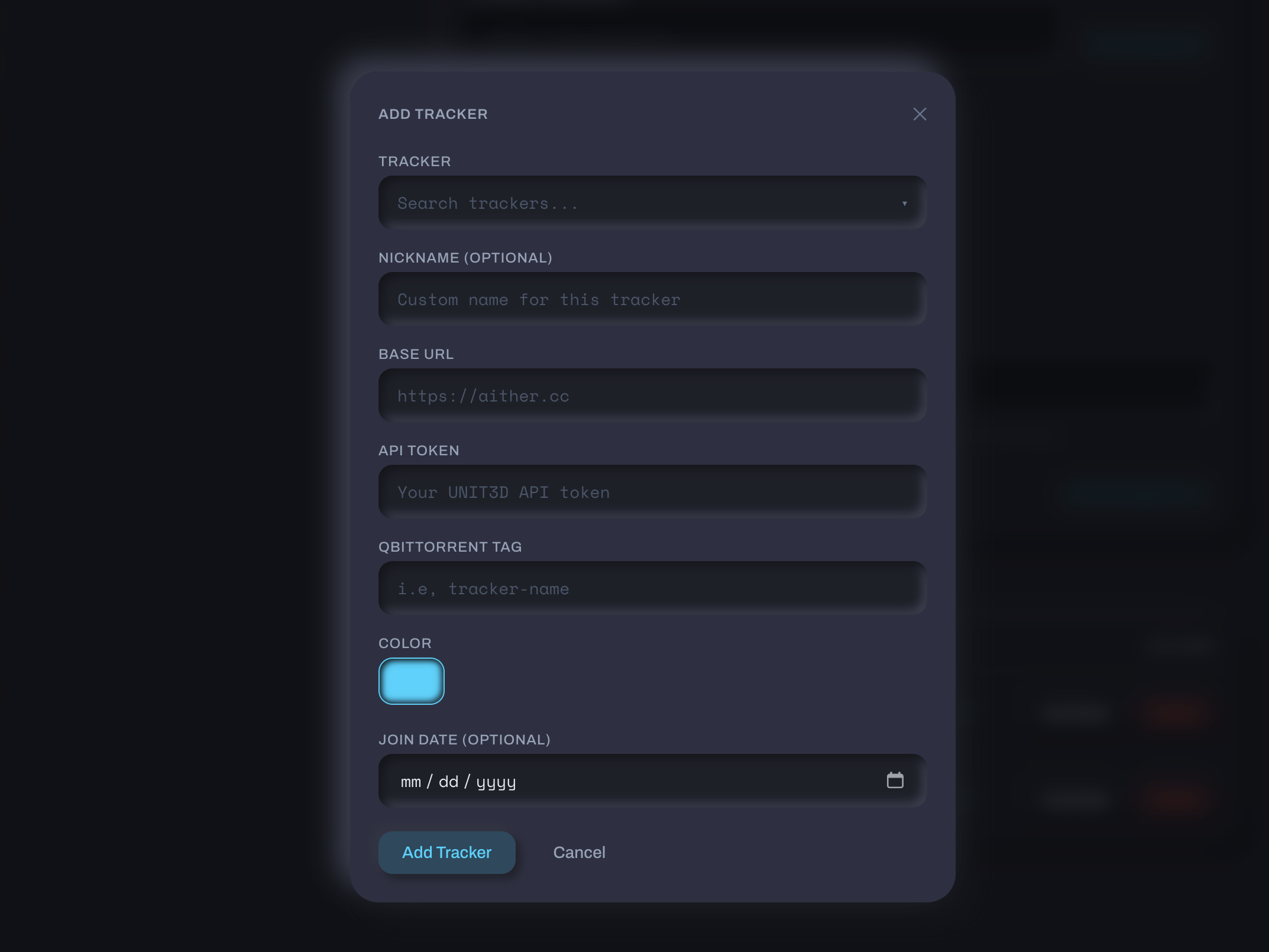
Tracker registry
| Name | Abbreviation |
|---|---|
| Aither | ATH |
| Blutopia | BLU |
| Concertos | |
| FearNoPeer | FNP |
| LST | LST |
| OldToons | |
| OnlyEncodes | OE |
| Racing4Everyone | R4E |
| ReelFlix | |
| SkipTheCommercials | STC |
| Seedpool | SP |
| Upload.cx | |
| DarkPeers | DP |
| Luminarr | LUME |
| Name | Abbreviation |
|---|---|
| AlphaRatio | AR |
| AnimeBytes | AB |
| BroadcasTheNet | BTN |
| Empornium | EMP |
| GreatPosterWall | GPW |
| MoreThanTV | MTV |
| Orpheus | OPS |
| PassThePopcorn | PTP |
| PhoenixProject | PPT |
| REDacted | RED |
| Name | Abbreviation |
|---|---|
| GazelleGames | GGn |
| Name | Abbreviation |
|---|---|
| Anthelion | ANT |
| Nebulance | NBL |
| Name | Abbreviation |
|---|---|
| AvistaZ | AvZ |
| AnimeZ | AnZ |
| CinemaZ | CZ |
| ExoticaZ | ExZ |
| PrivateHD | PHD |
| Name | Abbreviation |
|---|---|
| DigitalCore | DC |
| Name | Abbreviation |
|---|---|
| RetroToon World | RTW |
Draft entries
Some trackers show a dashed border saying "Stats tracking not yet supported." You can pin them as quicklinks, but they won't poll yet.
Added trackers hide from the list automatically.
Required fields
API token
Location varies by platform:
Go to Settings → Security → API Token or Settings → API in your account.
Copy the entire alphanumeric string.
Token rotation
Some UNIT3D trackers regenerate your token when you change your password. If polls stop working after a password change, grab a fresh token.
- RED / OPS: Settings → Access Settings → API Keys. Create a new key (read-only is fine).
- BTN / PTP / AB / others: check Settings → Security, Settings → API, or your profile.
Gazelle shows keys only once when created, so copy it right away.
Scoped keys
Some Gazelle forks support limited-permission keys. Since Tracker Tracker only reads your stats, read-only access works great.
Go to Settings → Access Settings → API Key and copy it.
GGn keys don't expire automatically, but you can regenerate them anytime from your settings.
AvistaZ uses browser cookies instead of API keys.
- Open the tracker in your browser and log in
- Open DevTools (F12 or Cmd+Option+I)
- Go to the Network tab
- Refresh the page
- Click any request to the tracker's domain
- Find the
Cookieheader in Request Headers - Right-click the Cookie header and select Copy Value
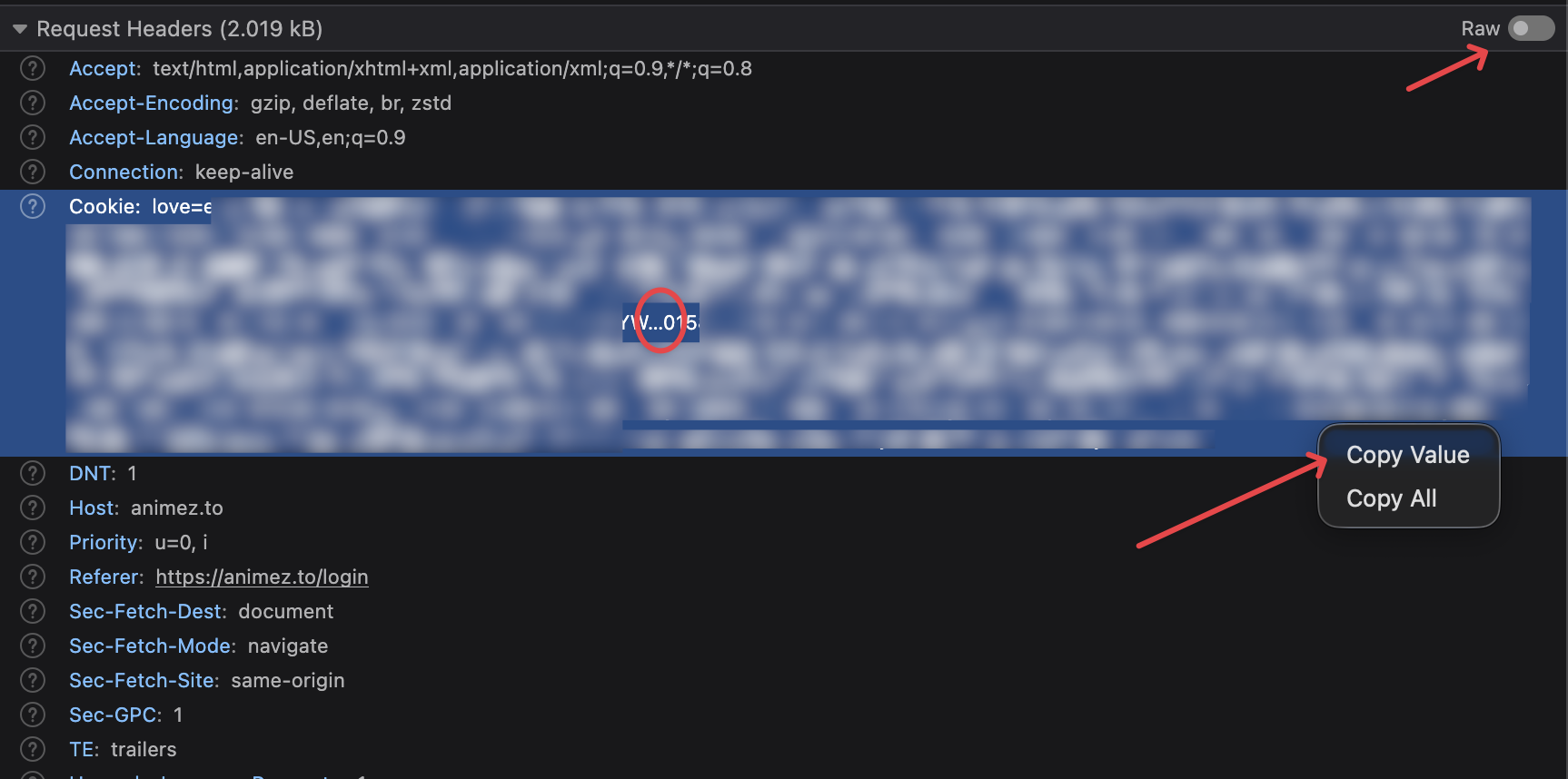
You'll also need your username on that tracker.
Paste both into the Add Tracker dialog. The User-Agent gets captured automatically.
Do not select and copy the Cookie value directly
Firefox (and some Chromium browsers) truncate long header values in the display, replacing the end with …. If you select the text and copy it, you'll get the truncated version with the ellipsis character embedded. This causes a "Tracker test failed" error.
Always use right-click → Copy Value to get the full, untruncated cookie string.
Cookie expiration
The Cloudflare cf_clearance cookie expires periodically. When polling fails, refresh it by repeating the steps above.
Newbie rank not supported
AvistaZ restricts Newbie accounts to limited site access. You need Member rank (5 GB upload, ratio ≥ 1.0, 7+ days old) before the profile page shows the data Tracker Tracker needs. Wait until promotion before adding the tracker.
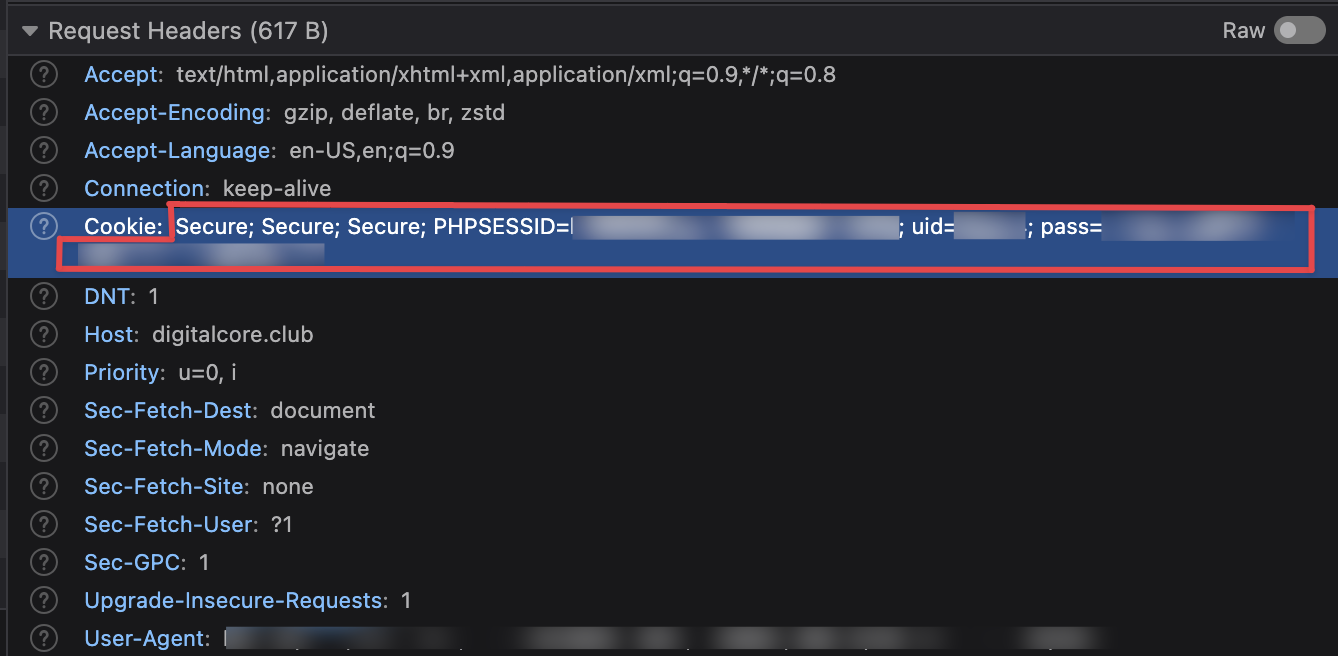
DigitalCore uses session cookies instead of API keys.
- Open digitalcore.club in your browser and log in
- Open DevTools (F12 or Cmd+Option+I)
- Go to the Network tab
- Refresh the page
- Click any request to
digitalcore.club - Find the
Cookieheader in Request Headers and copy its full value
The string will contain uid=... and pass=... among other values. Paste the entire thing into the Add Tracker dialog. Tracker Tracker extracts what it needs automatically.
Alternative: Application tab method
Go to Application → Cookies → digitalcore.club and copy the uid and pass values. Paste them as uid=12345; pass=abc123....
Use the same browser for both
Tracker Tracker also records the User-Agent of whichever browser you paste from, so polls match the session your cookies came from. Add or update DigitalCore from the same browser you are logged into DigitalCore in. Pasting from a different browser stores a User-Agent that does not match the cookies.
Cookie expiration
Session cookies expire when you log out or after extended inactivity. If polling fails with "Session expired," log back into DigitalCore and re-copy the cookie values.
DigitalCore's API key won't work
DigitalCore has an API key feature, but it only allows access to torrent search endpoints. User stats require session cookies, which is why Tracker Tracker uses the cookie approach.
TorrentLeech has no stats API, so Tracker Tracker logs in with your username and password and reads your profile page. The password is encrypted at rest with the same key as every other tracker credential.
2FA accounts need the Alt 2FA Token
If your account has 2FA enabled, also fill in the Alt 2FA Token field. Find it on the site under Site Profile → Alt 2FA Token. It is a static token made for third-party clients, not the rotating 6-digit code. Without it, adding the tracker fails with a message asking for it.
Re-entering credentials
Changing the stored credentials later replaces all of them at once. A 2FA account needs the token typed again alongside the username and password.
RetroToon's API key is upload-only, so Tracker Tracker reads your stats from your logged-in session instead.
- Open retrotoon.world in your browser and log in
- Open DevTools (F12 or Cmd+Option+I)
- Go to the Network tab
- Refresh the page
- Click any request to
retrotoon.world - Find the
Cookieheader in Request Headers - Right-click the Cookie header and select Copy Value
Paste it into the Add Tracker dialog. The User-Agent gets captured automatically, so add or update RetroToon from the same browser you are logged in with.
The rt_ API key will not work here
Settings → API Keys issues keys for /api/upload.php only, for pushing torrents from batch tools. No RetroToon endpoint returns user stats, and the key does not authenticate ordinary pages. The Torznab passkey on the Prowlarr page is search-only. Cookies are the only way in.
Cookie expiration
Session cookies expire when you log out or after a long idle period. When polling fails with "Session expired," log back in and re-copy the cookie string.
Do not select and copy the Cookie value directly
Firefox (and some Chromium browsers) truncate long header values in the display, replacing the end with …. Copying the selection gets the truncated version with the ellipsis embedded, which fails with a "Tracker test failed" error. Always use right-click → Copy Value.
Keep your token private
Your API token works like a password. Tracker Tracker encrypts it before storing it.
Optional fields
Proxy
If the tracker needs a proxy (i.e., for geo-restrictions), toggle Use Proxy on the tracker's settings page. See Proxy Support for setup.
Getting a red dot?
Check your API token. Most often it's a copy-paste error or a token that rotated after you saved it.
Poll manually
The Poll Now button on any tracker's detail page fetches stats immediately. Use it after updating a token or testing connectivity.
Manual polls don't interfere with the global schedule (default: every 60 minutes).
What stats each platform provides
Different platforms expose different stats. Here's what you'll get:
| Stat | UNIT3D | Gazelle | GGn | AvistaZ | DigitalCore | RetroToon | Notes |
|---|---|---|---|---|---|---|---|
| Upload | Yes | Yes | Yes | Yes | Yes | Yes | |
| Download | Yes | Yes | Yes | Yes | Yes | Yes | |
| Ratio | Yes | Yes | Yes | Yes | Yes | Yes | GGn shows extra decimal precision |
| Buffer | Yes | Yes | Yes | Yes | Yes | Yes | UNIT3D returns this directly; others calculate it from upload minus download |
| Seeding count | Yes | Partial | Partial | Yes | Yes | Yes | Some Gazelle forks and GGn may return 0 even when you're seeding |
| Leeching count | Yes | Partial | Partial | Yes | Yes | No | RetroToon publishes no leeching figure anywhere |
| Bonus points | Yes | Yes | Yes | Yes | Yes | Yes | GGn calls this "gold," DigitalCore calls it "bonuspoang" |
| Hit & Runs | Yes | No | Partial | Yes | Yes | Partial | RetroToon reports 0 reliably; a non-empty list reads as unknown for now |
| Required ratio | No | Yes | Yes | No | No | No | Not in the UNIT3D or DigitalCore API; RetroToon enforces no account ratio |
| Warned status | No | Partial | Yes | No | Yes | No | Most Gazelle trackers default to false; RED has extended data |
| Freeleech tokens | No | Partial | No | No | No | Yes | RetroToon calls them "freeleech slots" |
Gazelle: extra data on RED
REDacted and Phoenix Project return additional fields (warned status, join date, avatar, and detailed seeding/leeching counts), which gives you richer info than other Gazelle trackers.
GGn quirks
- Seeding/leeching can show 0: GGn's API doesn't always expose these counts. That's normal.
- Hit & Runs shows unknown for Elite Gamer and above, because those classes are HNR-immune.
- Gold, not seedbonus: GGn calls bonus currency "gold," which we map to the bonus points field.
Troubleshooting
Token not working
Make sure you copied the full token. UNIT3D tokens are usually 60-80 characters. Gazelle shows keys only once when you create them.
Poll fails with 401
Your token expired or was regenerated. Get a fresh token from the tracker's settings and update it.
Bonus points show unavailable
Some heavily customized Gazelle forks don't include bonus points in their API. The tracker just doesn't expose it.
Seeding count always shows 0
Some Gazelle forks and GGn don't expose seeding counts via their API. If you're seeding but see 0, it's a platform limitation.
Warned status always shows false
That's expected for most Gazelle trackers. Only RED and Phoenix Project provide this.